

Checked 21 October 2026. Rules from Acuity Insights' Step-by-Step Guide, Help Centre and Terms of Use, read 21 Oct 2026. Two Acuity pages disagree on keyboards and monitors; this page prints both.
Casper is taken online, on a desktop or laptop, under webcam proctoring, and the rules are strict: a Chromebook is not supported, the camera must stay on after the video section, and a retake is considered only for a verified technical fault that was not caused by your own device or internet connection. This guide puts Acuity Insights' test-day rules in the order you will meet them, flags where Acuity's own pages disagree (keyboards and monitors), and sets out what happens after you finish.
Acuity Insights Step-by-Step Guide and Help Centre, read 21 Oct 2026.
Sitting Casper in the January-February 2027 wave? On 27 October 2026 the Dates and Fees page listed U.S. Medicine on 5 January and 9 February, and English Casper 2 in Canada on 7 January, 21 January and 18 February (Eastern time). The countdown below runs to the next official date for your test type; every type and time is in our Casper test dates guide.
What your computer and room need
| Requirement | What Acuity says |
|---|---|
| Device | A desktop or laptop running Windows or macOS. Phones, tablets, iPads, Chromebooks and Linux are not supported; hybrid devices such as Microsoft Surface are allowed but may have technical issues. |
| Browser | Google Chrome or Mozilla Firefox only, fully updated. Acuity recommends having both installed. |
| Internet | At least about 1.5 Mbps download and 2 Mbps upload; faster is better. A wired connection is "significantly more reliable" than Wi-Fi. |
| Webcam and microphone | Required, built-in or external, and on for the whole test. Acuity advises a wired webcam and microphone if possible, to prevent battery failure or Bluetooth interference. |
| System check | Required at least once within 6 hours of your start time. Acuity's tip: run it from the place you will test, with the same equipment. |
| Before starting | Turn off VPNs, browser extensions (it names Grammarly) and firewalls. Acuity also recommends turning off pop-up blockers, closing other applications such as Zoom and restarting the computer. |
| Room | Acuity recommends a quiet, private space. No one else may be present, on or off camera, unless approved assistive personnel are part of an accommodation. |
The system check matters for more than convenience. Acuity says that if you have not completed it within the 6-hour window, you will be prompted to run it before you can begin, which can delay your start. And its retake rule excludes problems caused by your own device or connection, and Acuity adds: "This is why completing the System Requirements Check no more than six hours before your test is so important."
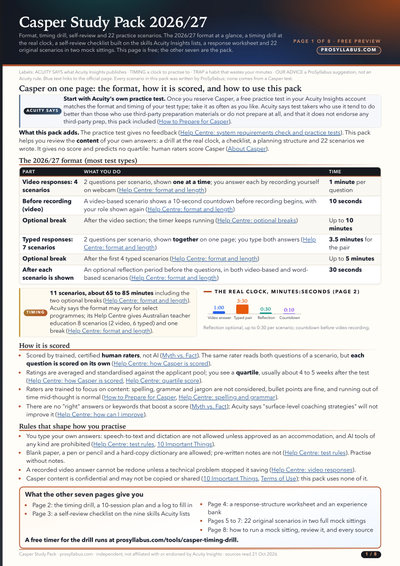
- 22 original scenarios in two full mock sittings
- A timing drill at the 2026/27 clocks, with a pacing log
- A self-review checklist on the nine skills Acuity lists
- A response worksheet and an experience bank
- A 10-session plan, ending with Acuity's own practice test
The day itself
From Acuity Insights' Step-by-Step Guide and Help Centre, read 21 Oct 2026. In the 2026-27 cycle, Australian teacher education has 2 video-response and 6 typed-response scenarios and only the first break.
Log in 30 minutes early. When the countdown reaches zero a Start button appears, and Acuity says you then have "15 minutes to click it and begin the test"; all system checks must already be done. If you miss the window you must reschedule, if another date is available, and a fee may apply. You cannot start the test until your identity is verified: during registration you upload photos of the front and back of a government-issued photo ID (in English or French; or, if you have none showing your full name and date of birth, another form of ID together with a birth certificate in English or French) and a live selfie. Acuity says you do not need to show ID at the start of the test itself.
During the test
You take the test alone (unless Acuity approved assistive personnel as an accommodation). Your webcam and microphone stay on, uncovered and facing you throughout, and your face must be visible except during the scheduled breaks. Acuity warns specifically: "Don’t turn off your camera after the video responses, this may invalidate your test." Typed answers must be typed in real time: speech-to-text and dictation are not allowed without an approved accommodation, and copy and paste is disabled. AI tools of any kind are prohibited. Acuity's pages differ on the breaks. Its breaks article says you may leave the room, check your phone, have a quick snack or talk to someone, with the timer still running, and after the second break you take a webcam photo before continuing. Its conduct guidelines list using a mobile phone "at any time during the test" and communicating with others during the test as prohibited behaviour, and do not say whether that covers the breaks. Follow the stricter rule, or ask Acuity before test day, and keep the phone out of sight whenever you are at the desk.
What you may have at your desk
Acuity's lists of permitted items do not all agree, and the difference is about equipment people commonly use. We print each source as published rather than pick one.
| Item | Step-by-Step Guide | Help Centre article on what you can have with you | "Test conduct guidelines" |
|---|---|---|---|
| Pen and blank paper | Allowed | Allowed | Not mentioned |
| Physical (printed) dictionary | Allowed | Allowed | Not mentioned |
| Headphones | Allowed (fully charged if Bluetooth) | Allowed (fully charged if Bluetooth) | Not listed as allowed or prohibited; "Evidence of earpieces or listening devices" may trigger a review |
| Food and drinks | Allowed | Drinks allowed | Not mentioned |
| External keyboard | Allowed | Allowed | Prohibited ("Using external keyboards") |
| Additional monitor | Allowed | Not mentioned | Prohibited ("more than one monitor or screen") |
| Pre-written notes, phone, smartwatch | Not allowed | Not allowed | Prohibited (phone, smartwatch, reading from scripts or pre-prepared responses) |
| AI tools | Not allowed ("AI tools of any kind") | Not mentioned | Prohibited |
| Voice or speech-to-text tools | Not allowed unless pre-approved accommodations | Not allowed unless approved accommodations | Speech-to-text or text-to-speech software prohibited unless explicitly approved |
If you plan to use an external keyboard or a second screen, ask Acuity first
- Acuity's Step-by-Step Guide lists both as allowed, but its Test conduct guidelines list both as prohibited behaviour. Until Acuity reconciles them, the safe course is one laptop, one screen, its own keyboard, or written confirmation from Acuity support before test day. (This is our advice.)
What gets a test flagged
Acuity's Test conduct guidelines list behaviours that are prohibited outright, and others that "may result in your test being flagged" for investigation and footage review, among them appearing to read from a script (for example repeated downward or sideward eye movements), frequently looking off screen or away from your monitor, any sign that a phone was used, copy-paste behaviour, and someone entering the room.
If a breach is found, Acuity says a red flag may be placed on your record and may be shared with the programs on your distribution list, your score may be cancelled or withheld, and you may be restricted from future testing. The practical lesson is the one Acuity's rules point to: test in a closed room, with your phone out of sight, and look at the camera when you are recording.
- 22 original scenarios in two full mock sittings
- A timing drill at the 2026/27 clocks, with a pacing log
- A self-review checklist on the nine skills Acuity lists
- A response worksheet and an experience bank
- A 10-session plan, ending with Acuity's own practice test
Retakes: considered only in rare technical circumstances
You cannot retake the same test type in the same admissions cycle to improve your score. The Terms of Use say retake requests are considered "only in the event of a technical problem, as verified by the Acuity proctoring and security team; otherwise, there are no retakes."
All three conditions for a technical retake
- The technical problem, and your request for a retake, are reported within one week of your test date.
- It is confirmed by Acuity Insights.
- It was not caused by your own device or internet connection.
Even then, a retake is offered only if another test date is available. Source: Acuity "10 Important Things" and Terms of Use.
Two more limits are easy to miss. By starting the test you confirm you are healthy enough to test, and Acuity says retests are generally not granted for pre-existing conditions; exceptions may be considered in cases of extenuating circumstances, but not for concerns raised after you have received your score. And a video answer you are unhappy with cannot be re-recorded unless you experience technical problems and the response does not save correctly. If something goes wrong during the test, use the chat icon on the test screen at once: Acuity says reporting early lets it assess and possibly fix the problem so you can continue.
After the test
Acuity distributes results directly to the programs on your distribution list about 2-3 weeks after the test; there is no email for that step, and your account shows "Completed – Results delivered" once they have gone. Acuity emails you when your quartile is ready, which usually happens around 4 to 5 weeks after the test date. Make sure the name, date of birth and ID numbers in your Acuity account match your applications exactly, because programs use them to match your result to your file. CaRMS is the exception: Acuity sends the score to CaRMS and you upload it to each CaRMS program that requires it.
What the score means, and what programs see that you do not, is in how Casper is scored. One last rule applies after the test as much as during it: Casper content is confidential. Acuity forbids copying, recording or taking screenshots of questions or scenarios, sharing details of the test online or with others, and posting about the content on social media or forums.
ProSyllabus is an independent study site, not part of or endorsed by Acuity Insights. Every rule, date and fee here is quoted or summarised from Acuity Insights' own pages or, where named, a program's own page.
Frequently asked questions
Can I take Casper on a Chromebook or iPad?
No. Acuity says phones, tablets, iPads, Chromebooks and Linux systems are not supported. Use a Windows or macOS desktop or laptop with Chrome or Firefox.
Can I retake Casper if I think I did badly?
No. You can take each Casper test type only once per admissions cycle. Retakes are considered only for verified technical problems reported within one week that were not caused by your own device or connection.
What happens if I am late for Casper?
Once the Start button appears you have 15 minutes to begin. If you miss that window you must reschedule if another date is available, and a fee may apply.
Can I use an external keyboard or second monitor for Casper?
Acuity's pages disagree. Its Step-by-Step Guide allows both; its Test conduct guidelines prohibit both. Ask Acuity support in writing before test day, or use a single laptop with its own keyboard and screen.
What can I do during the Casper breaks?
There is an optional 10-minute break after the video section and an optional 5-minute break after the fourth typed scenario (Australian teacher education has only the first). Acuity's breaks article says you may leave, use the restroom, check your phone or have a quick snack, and the timer keeps running. Its conduct guidelines, though, prohibit using a mobile phone "at any time during the test" and communicating with others during the test, without saying whether breaks are excepted. Follow the stricter rule, or check with Acuity before test day.
Sources
- official — Acuity Insights: "A Step-by-Step Guide for Test Takers" (PDF, no date in it; read 21 Oct 2026)
- official — Acuity Insights: "10 Important Things to Know Before Taking Casper" (PDF, no date in it; read 21 Oct 2026)
- official — Acuity Help Centre: "What are Casper test rules?" (page dated September 23, 2026; read 21 Oct 2026)
- official — Acuity Help Centre: "Test conduct guidelines" (page dated April 30, 2026; read 21 Oct 2026)
- official — Acuity Help Centre: "What can I have with me while taking my Casper test?" (page dated March 17, 2026; read 21 Oct 2026)
- official — Acuity Help Centre: "What can you do during optional breaks?" (page dated March 4, 2026; read 21 Oct 2026)
- official — Acuity Help Centre: "How to start your Casper test?" (page dated September 3, 2026; read 21 Oct 2026)
- official — Acuity Help Centre: "How to access the system requirements check and practice tests?" (page dated August 6, 2026; read 21 Oct 2026)
- official — Acuity Help Centre: "What if I am unhappy with my video response?" (page dated August 16, 2024; read 21 Oct 2026)
- official — Acuity Help Centre: "Can I retake my Casper test?" (page dated March 5, 2026; read 21 Oct 2026)
- official — Acuity Insights: "Terms of Use", sections 8.0 (Assessment Results), 13.2 (Retake Requests), 13.3 (Rescoring Requests) and 17.0 (Intellectual Property Rights and Confidentiality) (no date on the page; read 21 Oct 2026)
- official — Acuity Help Centre: "When and how are my Casper test results sent?" (page dated March 3, 2026; read 21 Oct 2026)
- official — Acuity Help Centre: "Can I distribute my Acuity Insights results to more programs?" (page dated March 2, 2026; read 21 Oct 2026)
- official — Acuity Help Centre: "What happens if I miss the final Casper test or score distribution deadline?" (page dated March 2, 2026; read 21 Oct 2026)
official = a document published by the conducting body. reported = a news or coaching site we could not check against an original. Where sources disagree this page says so rather than picking one.


